Most AI presentation tools are slide decorators. Investment professionals need analytical generators.
Current AI deck tools were built to style content you have already produced. Investment work needs the opposite.
Type this prompt into an AI tool tonight:
"Build me an IC update deck on Sundance Holdings. Pull Q3 performance from the latest management pack, benchmark against the deal thesis, add a comps set against the three names we discussed last quarter, and run a sensitivity on the exit multiple at 9 percent growth instead of 14."
Now try that prompt in Gamma. In Beautiful.ai. In Claude's PowerPoint add-in.
Nothing useful comes out.
That is because what you just typed is not a slide prompt. It is an analytical task. And the current generation of "AI presentation tools" are not built to do analytical tasks. They are built to take content you have already produced and turn it into styled slides.
This is the category mistake at the center of every AI deck tool review you have ever read.
What current tools actually do
The AI presentation tools competing for your attention right now fall into three rough buckets. None of them serves the work an investment professional or consultant actually performs.
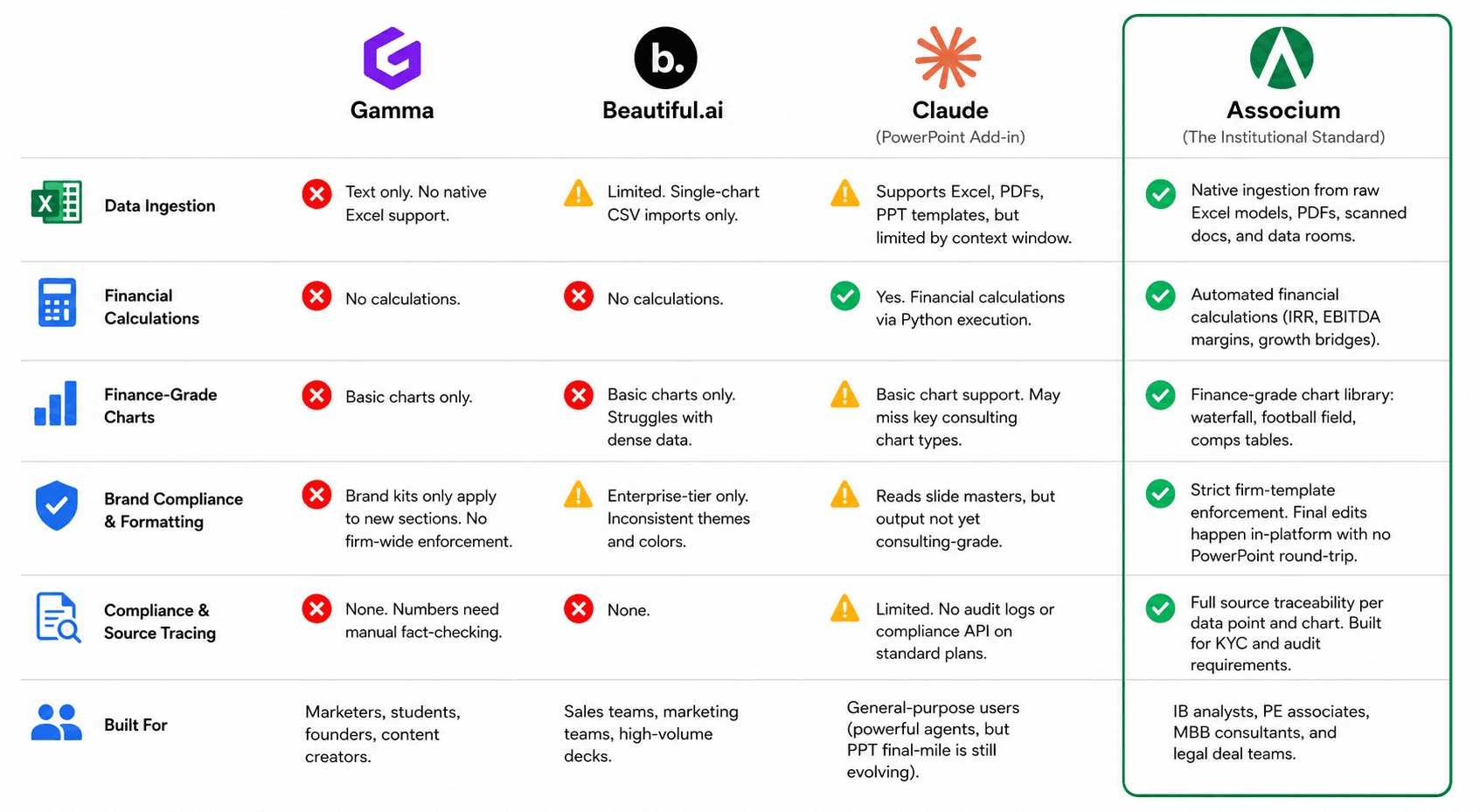
Gamma cannot ingest your raw inputs. Gamma's own help center is unambiguous: "Gamma currently only supports importing text." You cannot point it at a data room. You cannot drop in a 10-K. You cannot give it a CIM and ask for a comp set. Gamma turns a typed outline into a designed deck. That is a real product for content marketers and founders. It is not a product for the work you do.
Beautiful.ai cannot perform the analysis. It accepts a CSV, but only into one chart at a time. It has no analytical capability and no cross-source synthesis. A G2 reviewer captured the limitation directly: "Clients often require me to include several items on one slide. Beautiful.ai currently struggles with this." Its target user is a sales team building a high volume of pitch decks from a known template. Not you.
Claude can analyze but cannot finish the deck. Claude is the closest thing in this category to an analytical engine. It will read your Excel model, do the calculation, reason about your data. But the gap between Claude doing the analysis and Claude producing a client-grade deck is enormous. Independent testing by Deckary measured 20 to 40 minutes of PowerPoint cleanup per slide for Claude-generated decks to reach consulting standard. Anthropic itself acknowledges, in its own help center, that the PowerPoint add-in has no audit logs on Free, Pro, Max, or Team plans. You can run analysis in Claude. You will then leave Claude to build the actual deck.
The common thread: every one of these tools either skips the analytical work entirely or treats analysis and deck generation as two separate jobs that you are responsible for stitching together.
What an analytical generator does
For investment professionals and consultants, the bottleneck is not slide design. It is analytical work performed on raw inputs under time pressure. The CIM that landed Friday. The earnings transcript from yesterday. The model the associate built last week. The Q3 management pack that just arrived.
An AI tool that helps you only with the styling of the deck does not change your day. The styling is the last hour of the work. The analysis is the first ten.
Associum was built to invert that equation. You type the analytical task. The tool takes in the raw data, performs the analysis, and produces the deck. The analysis is part of the output, not a precondition for the input.
!image.png
Three capabilities make this possible.
1. Prompt to analytical deck, fully customizable
You type what you want analyzed and presented. Associum reads the source documents, runs the analysis, builds the charts, and lays out the slides.
You are not stuck with whatever the first pass produces. Every chart, every table, every number, every layout is editable. You can ask Associum to swap a comp set, recompute a sensitivity, redraw a chart, restructure an entire section, or rewrite a headline. The first generation is a starting point you build on, not a finished artifact you accept or reject.
This is the capability no other AI presentation tool offers. Gamma cannot perform the analysis. Beautiful.ai cannot perform the analysis. Claude can perform the analysis but cannot then produce a client-grade deck without significant manual cleanup. Associum does both in one workflow, customizable at every step.
2. Any amount of data
Investment work does not run on tidy CSVs. It runs on data rooms with hundreds of documents, Excel models with twenty linked sheets, filings that run to several hundred pages, and management packs that include presentations, spreadsheets, and PDFs in the same folder.
Associum was designed for that reality. There is no context window ceiling that forces you to chop your source material into chunks before the tool will engage with it. There is no file size limit that turns a real data room into an error message. Drop in what you have. Associum reads it.
This is the difference between an AI tool that demos well on a curated input and an AI tool that survives contact with your actual workflow.
3. Finishing happens inside the platform
This is where most users first notice that something is genuinely different.
In every other AI deck tool, the moment the AI hands you a draft is the moment you leave the tool. You export to PowerPoint. You spend the next several hours fixing fonts, repositioning charts, fixing the layout that broke on slide eight, restoring the title that flattened into an image. The tool's role ends. Your role as cleanup operator begins.
Associum keeps the work inside the platform. You refine the deck where it was generated. You adjust a chart's axis. You tighten a headline. You swap a layout. You change a number that just got revised in the underlying model and watch the dependent charts update. The export happens at the end, when you are ready to share. Not in the middle, as a forced step that breaks half the deck.
This is the closest the workflow gets to the way you actually work: open the task, work on it until it is done, share the output.
What this looks like in practice
Three weeks into a buy-side process you have fourteen documents from the seller, your associate's model, and a sector deep-dive your analyst pulled together. You are prepping for the next IC.
You type the prompt. EBITDA bridges across the last three years. Comps benchmarking against the names you have already loaded. Sensitivity on the exit multiple at the lower growth rate. A draft IC update deck in your firm's template comes back in minutes, every number traceable to its source.
The next stretch is refinement, inside Associum. You tighten the cover headline. You adjust one chart's axis range. You add a note to the ask slide. You change one assumption and let the dependent charts redraw themselves. You do not open PowerPoint.
You ship the deck and move on.
What AI in presentations should mean
The "AI presentation tool" category as it exists today was built for marketers, founders, and sales teams. Those tools serve those users well.
For an investment professional or a consultant, they solve the wrong problem.
The right problem is this: turn analytical work on raw inputs into client-grade decks without a chain of manual handoffs in between.
That is what Associum is built to do. If that workflow looks like yours, the next step is to see it run on your own data.
--
Associum is an AI associate built for professionals in finance, consulting, and compliance. Try it at associum.ai.