Associum's AI Excel Generator is in a Different Class.
A few weeks ago, an AI tool built you a three-statement model. The numbers tied, the formatting was clean, it went into the deck, and the deck went to the client. Good outcome.
Now you are back in the file. The client has updated guidance, so you change one revenue assumption to reflect it. Nothing moves. Total current assets does not update. Total assets does not update. You click into the cell, and where there should be a SUM formula, there is a hardcoded number. The tool did not build a model. It built a screenshot of a model. Every total in the workbook is now suspect, and you are checking each one by hand, which is the work you used the tool to avoid.
This is the quiet failure that sits underneath the current generation of AI Excel tools. They have gotten genuinely good at producing output that looks finished on the first pass. They are still not built to produce work that holds up the second time someone opens it, when the assumptions get flexed, the inputs get updated, and a client asks where a number came from.
For finance and consulting professionals, that gap is the entire job.
---
Two Kinds of Tools, One Confusing Category
Everything marketed as "AI for Excel" falls into one of two camps, and the marketing works hard to blur the line between them.
The first camp is the general models that grew spreadsheet features: ChatGPT, Claude, Microsoft Copilot. These are powerful reasoning engines that learned to touch a spreadsheet.
The second camp is the purpose-built Excel agents, with Shortcut as the clear leader. For these tools, the grid is the whole job. They automate the manual labor of building and editing cells, and what they hand back is the spreadsheet itself.
Both camps share a hidden assumption: that the unit of work is the spreadsheet. You bring a spreadsheet, or a blank grid, and the tool helps you fill it. That assumption is exactly where they part ways from how finance and consulting work actually gets delivered. The spreadsheet is rarely the deliverable. It is one component inside a deliverable, the model behind the memo, the analysis behind the recommendation, the numbers behind the deck.
Here is how the field actually performs once you stop watching the demo and start doing the work.
---
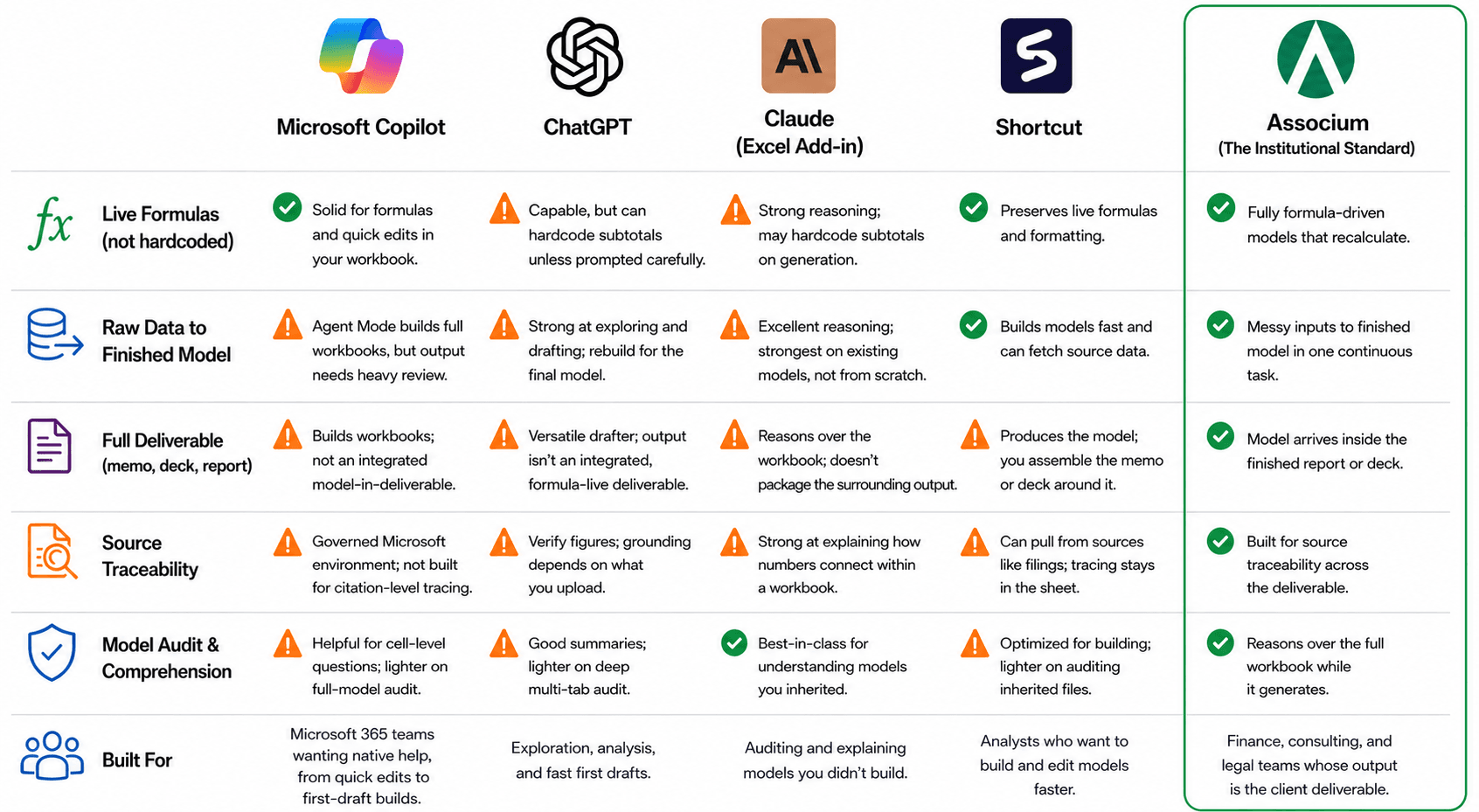
Microsoft Copilot: Already in the Building, Not Yet Ready to Deliver
Copilot has the one advantage no one else has. It is already inside Excel, inside Microsoft 365, with no separate login, no data export, and no security review to clear. For a SUMIF formula, a quick pivot table, or a basic chart, it is fast and it is right there.
Copilot now comes in two modes, and the distinction matters. The classic in-cell assistant is built for single-turn help: write this formula, summarize this range, make a chart. The newer Agent Mode is a builder. It can take a broad instruction and generate a multi-sheet workbook, link formulas across tabs, and add explanations. So the old line that Copilot only writes formulas is no longer true.
The catch is reliability, not capability. In independent testing, Agent Mode's full-model builds came out inconsistent and incomplete, needing heavy editing, and Copilot landed in the lower-middle of the pack when graded against investment banking standards. Ask it to read a fifty-page CIM, extract the metrics, cross-check them against a data room, and populate a valuation model, and it will attempt the whole chain, but you cannot trust the result without working through it cell by cell. Microsoft itself frames Agent Mode as a junior analyst whose work you supervise, and attaches disclaimers reminding users to verify the numbers before making financial decisions.
Best use: quick in-context help inside a workbook you already have, with Agent Mode as a fast first draft you then audit.
---
ChatGPT: Fast, Versatile, and Quietly Hardcoding Your Totals
ChatGPT with its data analysis mode was the fastest tool in independent hands-on testing and the most flexible for open-ended exploration. Upload a workbook, ask it to clean the data, summarize trends, draft a financial statement, and it will do all of it quickly using Python behind the scenes.
The problem shows up in the formulas. In head-to-head testing on a balance sheet build, ChatGPT got the numbers right but wrote the subtotals as hardcoded values instead of live SUM formulas. In an exploration, that does not matter. In a model that someone will edit, it is a landmine. The totals look correct until the moment an input changes, and then they are silently wrong, and no one knows.
In Wall Street Prep's 2026 testing of a three-statement model against investment banking standards, ChatGPT scored lowest of the major tools. Not because it is a weak model, but because finishing a defensible model is a different task from answering a question well.
Best use: exploring a dataset and drafting analysis you will rebuild properly later.
---
Claude for Excel: The Best Auditor in the Room
Claude has gone directly after the finance workflow, and it shows. As an add-in that reasons over an entire workbook as a connected system, it is arguably the best tool available for understanding a model you did not build. Point it at a forty-tab monster with assumptions buried three layers deep and ask it to explain the calculation flow, flag circular references, and surface every hardcoded value, and it is genuinely excellent. For audit and comprehension, nothing in the category is better.
Generation is a different story. In an independent hands-on test, Claude made the same mistake as ChatGPT, writing subtotals as hardcoded values instead of SUM formulas, and it was the slowest of the four tools to finish that task. Strong reasoning does not automatically translate into a clean, formula-driven, reusable build.
Best use: auditing, explaining, and stress-testing a model that already exists.
---
Shortcut: The Strongest Specialist, and the Clearest Comparison
Shortcut is the most direct competitor and deserves real credit. It is a purpose-built Excel agent that builds DCFs, LBOs, and three-statement models from natural language, runs as both a web app and a native Excel plugin, preserves formulas and formatting, and exports clean .xlsx files. It can fetch data from sources like SEC filings, and it led the AI tools in Wall Street Prep's testing. If your goal is to compress the manual hours of wiring up the model itself, it is the best boutique option available.
But notice what Shortcut is built to be: a faster analyst whose output is the spreadsheet. Its own framing is about getting back the thousands of hours teams spend manually wiring and updating models. That is a real and valuable problem. It is also a spreadsheet problem. Shortcut makes you faster at the cell-level work, and the thing it produces is the model itself. It does not produce the memo around the model, the deck the model feeds, or the report a client actually receives. The spreadsheet is where it stops, and you assemble the deliverable around it yourself.
Best use: building and editing models faster, for people whose output is the model itself.
---
The One Honest Benchmark Everyone Should Sit With
Across the most rigorous public testing of these tools on a real investment banking modeling task, the result was the same every time. The best AI tool still underperformed a junior analyst. The specialists beat the general models, the general models beat each other, and every one of them came in below a first-year analyst, who in turn came in well below a senior one.
That is not a reason to dismiss AI Excel tools. It is a reason to be precise about what they are. Today, they take a model from zero to roughly sixty percent. They kickstart. They do not finish. The finishing, the part where the formulas are live, the assumptions are linked, the numbers are traceable, and the whole thing survives review, is still the hard part, and it is still the part that matters.
---
Where Associum Is Built Differently
Associum starts from a different unit of work. Not the spreadsheet. The deliverable.
You give Associum the raw data and the analytical task. It runs the calculations, builds the model with live formulas rather than baked-in numbers, and produces it as part of the finished deliverable, the report, the memo, the deck, whatever the work actually requires. The model is not the end of the process you then have to package. It arrives already inside the package.
Three things follow from that design, and they map directly to where the rest of the field stops.
Raw data to finished model, end to end. The other tools assume you arrive with a structured workbook or a clear grid to fill. Associum assumes you arrive with messy inputs and a question. It does the preparation, the calculation, and the build as one continuous task, so there is no manual stitching between research, model, and output.
Live formulas, not hardcoded screenshots. The most common failure in the category is the model that looks finished and breaks the moment you touch an input. Associum is built so the model recalculates, because a deliverable that cannot be edited and re-run is not a deliverable a professional can stand behind.
Traceable, and built for client work. Finance and consulting deliverables get questioned. Someone asks where the number on page four came from. The tools built for general spreadsheet help were not designed for that moment. Associum is, because the work it produces is meant to leave the building.
---
Under the Hood: Why the Engine Choice Decides the Output
Most of this comparison is about what these tools are for. This part is about how they are built, because the engineering decision underneath an Excel generator quietly determines the quality of everything it produces.
Associum generates spreadsheets server-side using openpyxl as its engine. openpyxl writes the actual .xlsx file directly, putting genuine formula strings into cells, which is why the models come out formula-driven rather than filled with hardcoded numbers. The browser-based specialists take a different path. They render an Excel-like grid in the browser through a JavaScript spreadsheet component and drive generation through that component's built-in functions.
That choice has consequences that show up in speed, cost, and reliability.
The first is how well the underlying engine is represented in the data these models learned from. Python and openpyxl are everywhere in that data. They are among the most common ways anyone has ever written a spreadsheet programmatically, so a model generating openpyxl code is working in a language it has seen millions of times and writes fluently. A proprietary JavaScript spreadsheet library and its function API is far more niche by comparison. Generating against it means the model is working in territory it has seen far less of, which makes the process slower, more token-intensive, and more prone to the kind of errors that need extra passes to catch and fix. The same model produces cleaner output faster when it is writing code it knows well.
The second consequence is the honest tradeoff, and it is worth being direct about it. openpyxl is not feature-complete. Out of the box it does not natively support everything an institutional model needs, pivot tables being the clearest example. The naive answer is to accept that limitation. Our answer is to remove it. We extend and modify the openpyxl library itself to support the features it lacks, so we keep the speed and reliability of generating against a well-understood engine while still producing the full set of structures, pivot tables included, that real finance and consulting work demands.
The result is the combination the rest of the field has to choose between. A generation path the model handles fluently, which means faster and cheaper builds with fewer errors, and the feature completeness of a purpose-built spreadsheet engine, which means the output is not missing the pieces institutional work requires. The engine is not a detail. It is the reason the formulas are live, the builds are fast, and the models hold up when someone opens them again.
---
The Verdict
The AI Excel tools have crossed a real threshold. Copilot is a genuinely useful formula assistant. ChatGPT is fast and flexible for exploration. Claude is the best auditor of a model you inherited. Shortcut is the strongest specialist for building the spreadsheet itself faster. If your job ends at the spreadsheet, these are good tools and getting better.
But finance and consulting work does not end at the spreadsheet. It ends at a deliverable that goes to a client, gets questioned in a meeting, and gets reopened next quarter. The current generation of AI Excel tools makes you faster at one component of that work. Associum is built to produce the whole of it, from raw data to finished, defensible output.
The question is not whether AI can build a spreadsheet anymore. It can. The question is whether it can build the thing you actually send. That is the work Associum was built for. --
Associum is an AI associate built for professionals in finance, consulting, and compliance. Try it at associum.ai.